Device data: Fuzzby
Source snapshot · build reference: · 1.0.033r · Sources
- Sale price
- ¥126,000
- Intact value
- ¥140,000
- Parts
- 18
- Screws
- 16
- Difficulty
- Hard
- Licence
- ¥230,000
- Replacement total
- ¥140,010
Entry fee: ¥1,800 · Prize: ¥7,400 · Shop-clock time: 2h 39m
Parts in assembly order
| Assembly order | Parts | Quantity | Unit price | Screws |
|---|---|---|---|---|
| 1 | Board | 1 | ¥16,330 | 0 |
| 2 | Left Panel | 1 | ¥4,670 | 3 |
| 3 | Right Panel | 1 | ¥3,110 | 2 |
| 4 | Motor | 1 | ¥17,110 | 0 |
| 5 | Gear block | 1 | ¥16,330 | 0 |
| 6 | Face mechanism | 1 | ¥9,330 | 2 |
| 7 | Bottom case | 1 | ¥7,000 | 0 |
| 8 | Microphone | 1 | ¥3,500 | 0 |
| 9 | Speaker | 1 | ¥7,780 | 2 |
| 10 | Face | 1 | ¥10,110 | 2 |
| 11 | Left case | 1 | ¥8,560 | 1 |
| 12 | Right case | 1 | ¥8,560 | 3 |
| 13 | Fur | 1 | ¥19,440 | 0 |
| 14 | Battery Cover | 1 | ¥1,940 | 1 |
| 15 | Battery | 4 | ¥1,560 | 0 |
Match this recorded restoration to your device
This guide follows IM PC Gaming.’s 7-minute-43-second Fuzzby video, rather than the update trailer. The same source shows a marketplace/workbench restoration, removed fur and case parts, internal components, replacement shopping, reassembly and a Perfect completion. It is a third-party example, not a customer-order trigger guide or our own playtest. The uploader identifies PC gaming and the October update; the executable build, operating system, save ID and default/beta branch are not displayed. No exact-build compatibility is claimed.
Clean the Fur and follow its own progress
At approximately 0:43, the Fur is separated on the mat and its To-Do list says Remove dirt: 44%. The brush is selected. Work over the exposed fur and rotate it to inspect the remaining dirty areas; use the part’s percentage as your checkpoint. Cleaning the outside does not establish that the internal device is repaired. Keep the removed covering beside the same unit so it is available for the final rebuild.
Fur cleaning checkpoint — 0:43
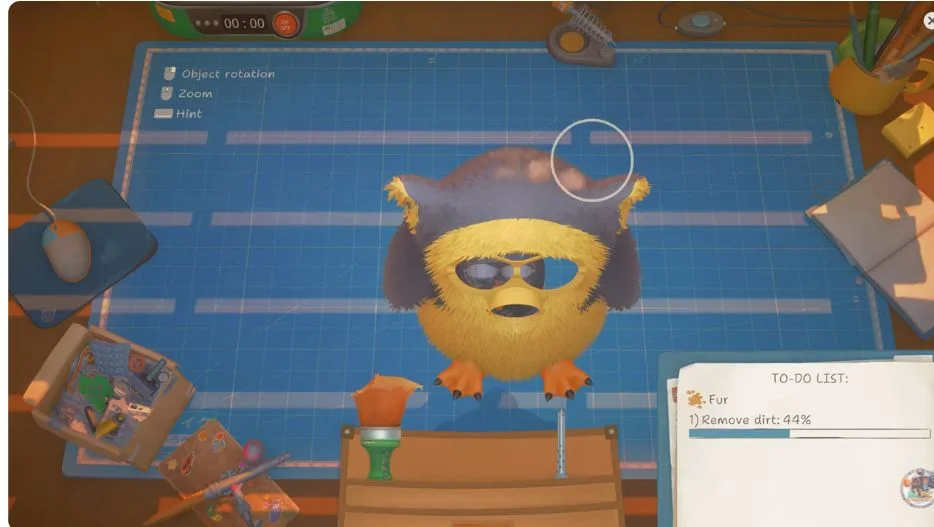
Fur cleaning — creator frame at 0:43. IM PC Gaming.; executable build and branch not shown. Notebook value is not a sale receipt.
Expose the case without guessing a screw total
At 0:58 the Fur is beside the device and the dark case is rotated, with individual fasteners highlighted. Rotate the case to reveal the active fastening points and remove the fasteners belonging to the current layer before lifting it. Keep the left and right case pieces distinct. A visible screw highlight establishes where the creator acts in this example, not a complete screw inventory for every Fuzzby. Do not force an apparently blocked panel or import screw counts from the old Furby competition label.
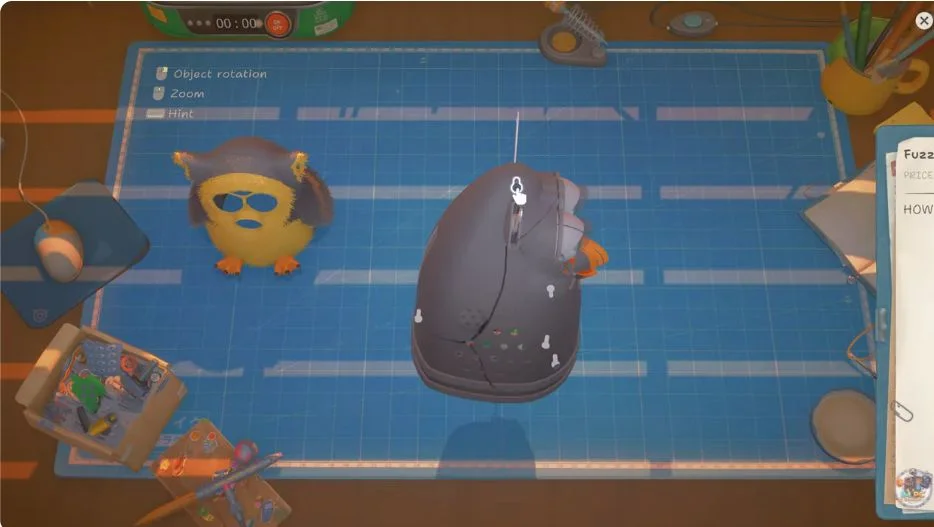
Outer case — creator frame at 0:58. IM PC Gaming.; executable build and branch not shown. Notebook value is not a sale receipt.
Use the exposed mechanism and Notebook together
At 2:38, the covering and outer case are off, the inner mechanism is visible, and the Notebook names Fuzzby. Visible entries include Speaker, Face, Left case, Right case, Fur, Battery Cover and individual Battery rows. Several entries carry warning markers. Inspect the relevant parts in your own unit instead of treating every marked part in this recording as a fault in your order. Keep batteries and small removed pieces with this device, and track which layer each came from. This frame identifies the device and internal state; it does not expose every part name or prove a full parts total.
Internal mechanism and Notebook — 2:38
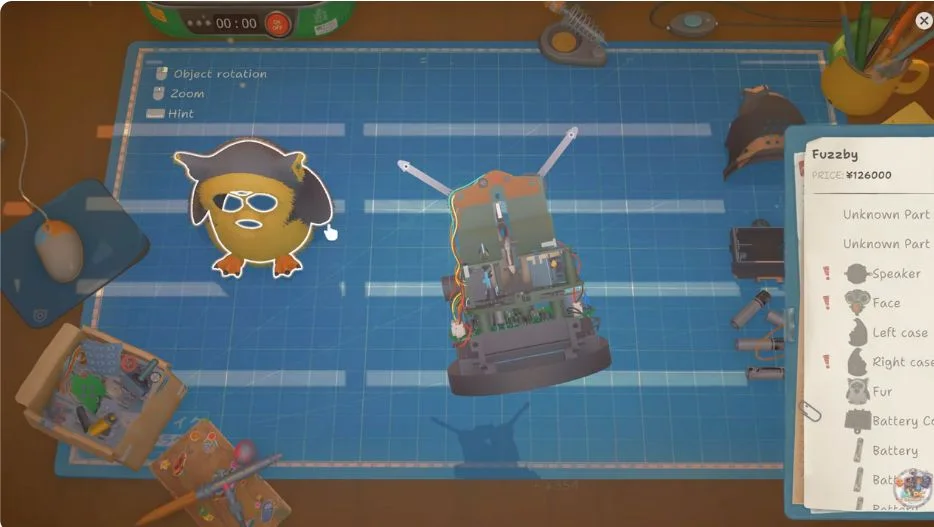
Internal mechanism and Notebook — creator frame at 2:38. IM PC Gaming.; executable build and branch not shown. Notebook value is not a sale receipt.
Order parts for Fuzzby, then return to the same unit
Around 4:06 the creator opens Packuten with the model filter set to Fuzzby. Gear block and Motor listings are visible, and a Motor is selected. Match both the exact model and the component diagnosed in your Notebook. Do not buy the entire catalogue or substitute a similar real toy’s motor. The recorded screen demonstrates model-specific shopping; it is not a fixed shopping list for every repair, and the displayed shop prices are not adopted here as current guaranteed costs. Return to the same workbench device and complete its outstanding tasks before closing it.
Rebuild to the Notebook checkpoint, then check Perfect
The late recording shows the case being fastened again and the Fur restored. At about 7:16 the assembled Fuzzby is on the mat with Perfect! visible; later it leaves the workbench. The source also shows an 18/18 reassembly counter, but that counter is a recorded screen result, not an independently audited parts database. Restore the internal layers before the shell and covering, checking the Notebook after each fitted part. An attractive exterior alone is not the completion test. If your unit lacks the same completion signal, reopen the outstanding task rather than assuming the recording guarantees a successful hand-in or a fixed sale payment.
Perfect completion checkpoint — 7:16
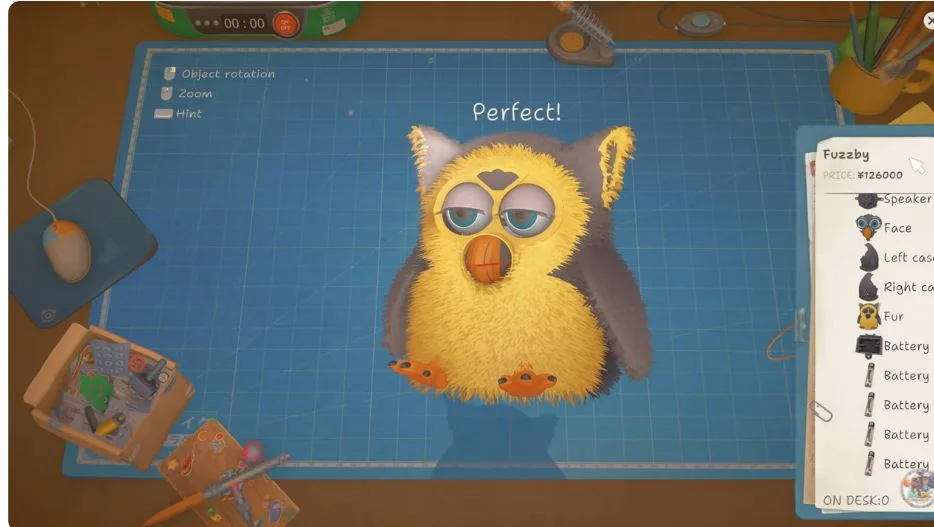
Perfect completion — creator frame at 7:16. IM PC Gaming.; executable build and branch not shown. Notebook value is not a sale receipt.
When your repair differs
Separate a different fault from a failed interaction. If dirt remains, select the named part and inspect another side. If a panel will not lift, inspect that layer’s fasteners and dependencies. If the shop cannot supply a component, confirm the model filter and your available license in-game; this recording does not establish a universal license unlock day or price. If reassembly stalls, compare missing Notebook entries with the pieces on your mat. Preserve the save before experimenting with a suspected bug and use Current Problems for the matching symptom. Fuzzby’s addition does not require every player to install beta_version: that branch is for the specific story-progression issue described in the update guide.
What this guide establishes
Four attributed frames document cleaning, case access, internal inspection and the recorded Perfect result from one creator video. The guide was checked on October 29, 2026. It does not provide a verified all-parts list, total screw count, license price, competition target, universal fault pattern or guaranteed resale price. A Notebook value visible in a frame is not a final transaction receipt. Fuzzby remains separate from the old Furby label, and the Nony PlayMachine Controller is a different device entirely. Existing competition and achievement progress is unchanged.