Open the parts store and check the Other category with the television icon before assuming the order is broken. That is the developer's direct answer to the current WT2000 missing-parts report. Confirm that the Autorolla phone license is active, reopen the order, and search for the exact component named by the diagnosis. The report confirms where to look; it does not prove that every missing listing has the same cause.
Device Quick Data
- Parts
- —
Unknown
No reliable value is available yet.No publishable evidenceAwaiting a reproducible observation. - Screws
- —
Unknown
No reliable value is available yet.No publishable evidenceAwaiting a reproducible observation. - License
- Autorolla phone license
Confirmed
Supported by official information, a developer reply or first-party testing.Build not recordedDeveloper answer in Steam discussions - Observed sale value
- —
Unknown
No reliable value is available yet.No publishable evidenceAwaiting a reproducible observation. - Competition
- —
Unknown
No reliable value is available yet.No publishable evidenceAwaiting a reproducible observation. - Difficulty
- —
Unknown
No reliable value is available yet.No publishable evidenceAwaiting a reproducible observation. - Current build
- 1.0.015
Confirmed
Supported by official information, a developer reply or first-party testing.Build 1.0.015Verified: Steam build and official announcementsSite build reference; not a test of every field. - Common issue
- Parts may appear under Other (television icon)
Confirmed
Supported by official information, a developer reply or first-party testing.Build not recordedDeveloper answer in Steam discussionsThis location answer does not prove every missing-listing report has the same cause.
Disassembly Layers
Layer order not yet verified; record the in-game Notebook before disassembly.
Quick answer: parts do not appear in the shop
Open the parts store and check the Other category with the television icon before assuming the order is broken. That is the developer's direct answer to the current WT2000 missing-parts report. Confirm that the Autorolla phone license is active, reopen the order, and search for the exact component named by the diagnosis. The report confirms where to look; it does not prove that every missing listing has the same cause.
Autorolla WT2000 data card
This table separates current source-backed data from fields that still need a reproducible release-build count. Unknown values are deliberately not copied from a similar real phone or another ReStory model.
| Field | Current record | How to use it |
|---|---|---|
| Device family | Folding mobile phone | Use the Autorolla phone license and matching parts |
| Order source | Online repair confirmed | Read the ticket before shopping |
| Parts category | Other · television icon | Developer-confirmed place to check |
| Observed sale value | ¥18,900 | Steam guide record from build 1.0.009; not a guaranteed price |
| Screw count | Not independently verified | Count each removal layer on the current copy |
| Assembly pattern | Core → display/keypad → hinge/frame → shells → screws | Inside-out checklist; verify against the placement prompts |
Parts checklist before spending
Diagnose the accepted order first and write down the exact damaged or missing component. Treat the board, display, keypad or key membrane, hinge or frame pieces, front and rear shells, antenna assembly, battery-side pieces, and fasteners as separate inspection groups—not as a claim that every order replaces all of them. Search the Other category for the named part, compare direct stock with a same-model donor, and keep the repair payout separate from the documented marketplace sale value.
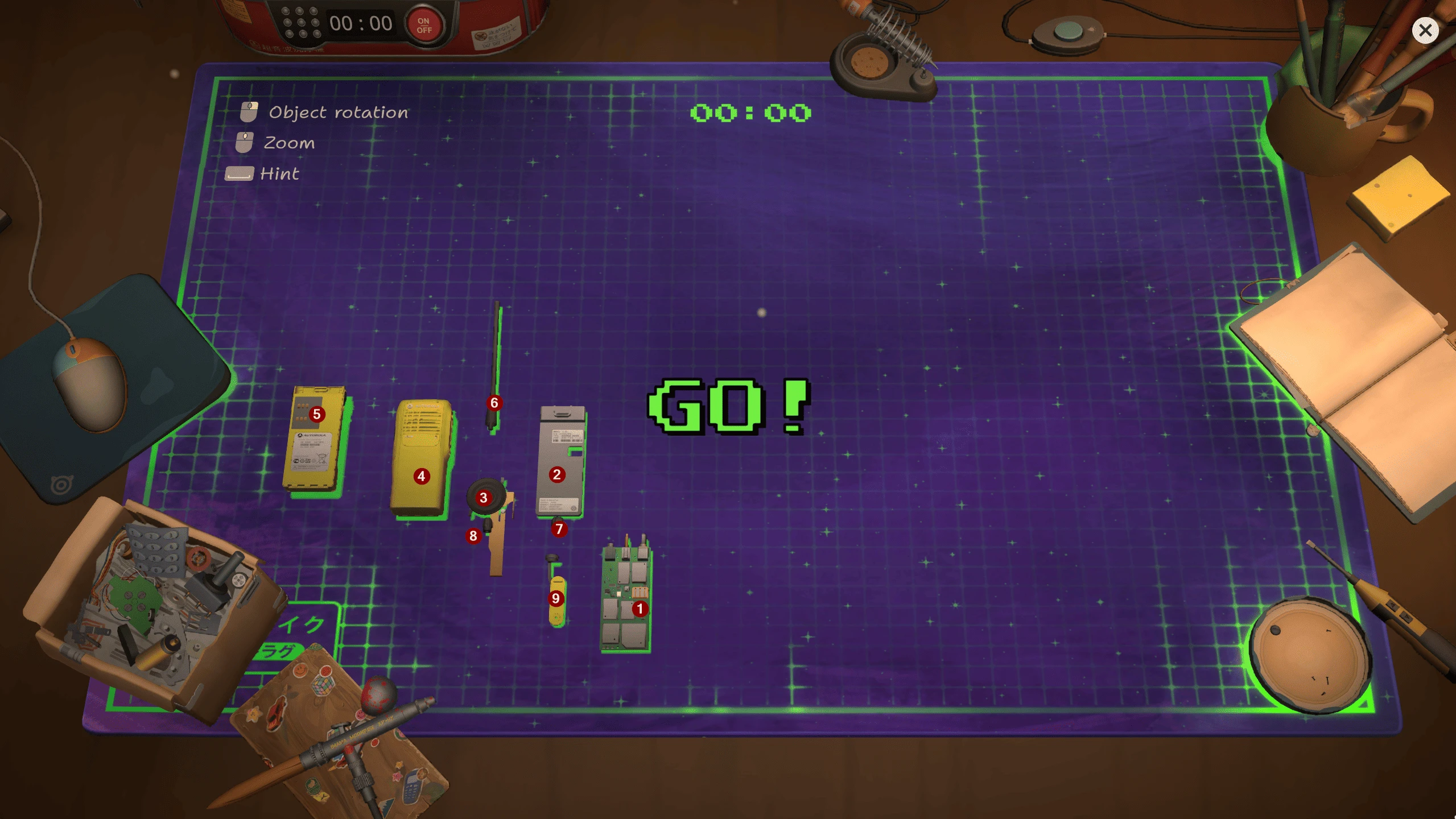
WT2000 radio body, antenna, board and loose controls. Competition layout; red numbers are the source author’s annotations.
Stable teardown and screw ledger
Save before opening a customer device. Photograph or note the assembled front, rear, hinge, and antenna orientation. Remove exterior fasteners first, keep each screw with the layer it released, and stop whenever the next part still appears blocked. The exact WT2000 screw total has not yet been independently verified, so use the in-game removed-item count as the checksum for this copy rather than publishing a guessed number.
Antenna placement without forcing it
Leave the antenna until its supporting frame and shell channel are visible. Match the base to the accepted mounting point, rotate the phone so the target is unobstructed, and wait for the placement highlight before releasing it. If it will not snap in, remove the shell or frame layer that was installed too early and try again. Do not compensate by forcing the cursor or repeatedly dropping the part; a wrong layer order can hide the valid target.
Inside-out assembly order
Rebuild from the deepest accepted layer outward. Seat the board and internal connectors first; place the display and keypad/control pieces next; align the hinge or internal frame; add antenna and battery-side parts while their channels are exposed; close the front and rear shells; then return each screw to its original layer. After every stage, rotate all faces and confirm that no loose component, red marker, dirty surface, or broken-part objective remains.
Unable to complete the order
Reopen the ticket and compare each remaining objective with the device, inventory, parts box, and store. Check the Other category again, then look for a component left on the table or hidden in a box. If the task is still blocked, preserve the save and report the build, order source, license status, exact part name, store category, current assembly layer, and screenshot of the objective tracker. That distinguishes a missing listing from a forgotten part or a true progression fault.
Competition and marketplace use
Autorolla WT2000 appears in the current 29-device Akiba Championship roster. Practice its inside-out order on normal work before using it for Legend of Akiba. The community sale-price record lists ¥18,900 on build 1.0.009, but marketplace values should be treated as dated observations. A competition build, customer repair, online order, and resale copy can present different goals even when the shell is the same.
Research links
These are the primary pages used to check the facts and current release context in this guide.
Official information, observable release behavior, and community reports are deliberately separated. A community report is not presented as a universal fix until it can be reproduced or supported by current patch notes.