Check the Nerdio W-91F ten-part notebook record, Top Strap versus Bottom Strap, and what to inspect when the lower strap will not attach. Nerdio W-91F is a watch repair. The independent ReStory Help record lists ten components, ending with Top Strap and Bottom Strap. The table preserves the English game labels so you can compare the notebook without confusing the two straps. The list follows the launch-window notebook; use current placement prompts for installation.
Device Quick Data
- Parts
- 10
- Screws
- —
Unknown
No reliable value is available yet.No publishable evidenceAwaiting a reproducible observation. - License
- —
Unknown
No reliable value is available yet.No publishable evidenceAwaiting a reproducible observation. - Observed sale value
- —
Unknown
No reliable value is available yet.No publishable evidenceAwaiting a reproducible observation. - Competition
- —
Unknown
No reliable value is available yet.No publishable evidenceAwaiting a reproducible observation. - Difficulty
- —
Unknown
No reliable value is available yet.No publishable evidenceAwaiting a reproducible observation. - Current build
- 1.0.015
Confirmed
Supported by official information, a developer reply or first-party testing.Build 1.0.015Verified: Steam build and official announcementsSite build reference; not a test of every field. - Common issue
- Bottom Strap attachment difficulty
Reported
Player-reported behavior; results may vary by build.Build not recordedPlayer reportNot confirmed as universal.
Disassembly Layers
Layer order not yet verified; record the in-game Notebook before disassembly.
The ten-part notebook record
Nerdio W-91F is a watch repair. The independent ReStory Help record lists ten components, ending with Top Strap and Bottom Strap. The table preserves the English game labels so you can compare the notebook without confusing the two straps. The list follows the launch-window notebook; use current placement prompts for installation.
| Position | In-game part name | Meaning |
|---|---|---|
| 1 | Front Panel | Front Panel |
| 2 | Screen | Screen |
| 3 | Internal Casing | Internal Casing |
| 4 | Circuit Board | Circuit Board |
| 5 | Battery | Battery |
| 6 | Battery Cover | Battery Cover |
| 7 | Gasket | Gasket |
| 8 | Back Panel | Back Panel |
| 9 | Top Strap | Top Strap |
| 10 | Bottom Strap | Bottom Strap |
Before removing the watch layers
Read the customer ticket and inspect the watch from both sides. Keep the top and bottom straps separate, then work only on parts the game exposes. Record any fasteners as you remove them rather than guessing from the ten-part total: a part count is not a screw count. Neither the screw total nor a current sale value is verified in this page. Preserve the original part when you are unsure whether the task calls for cleaning or replacement.
Bottom Strap will not attach
A Steam discussion specifically reports that Bottom Strap can be difficult to attach. The available evidence does not establish a universal fix or exact click location. Check that you selected Bottom Strap rather than Top Strap, rotate the watch to inspect the receiving side, and compare the visible mounting preview with the notebook. Verify the preceding case layers are seated. These are diagnostic checks, not a claim that a particular angle fixes the bug.
Community targeting tip: hold the watch upright with its back facing you, then inspect just below the body rather than only the visible connector. Replies describe an offset attachment area there; another suggests slowly moving the selected strap from the opposite side toward the correct side. These are player workarounds, not a tested hitbox map or a guaranteed fix. Other replies still report failure. If the preview never engages, stop and preserve the save instead of repeatedly dismantling the whole watch.
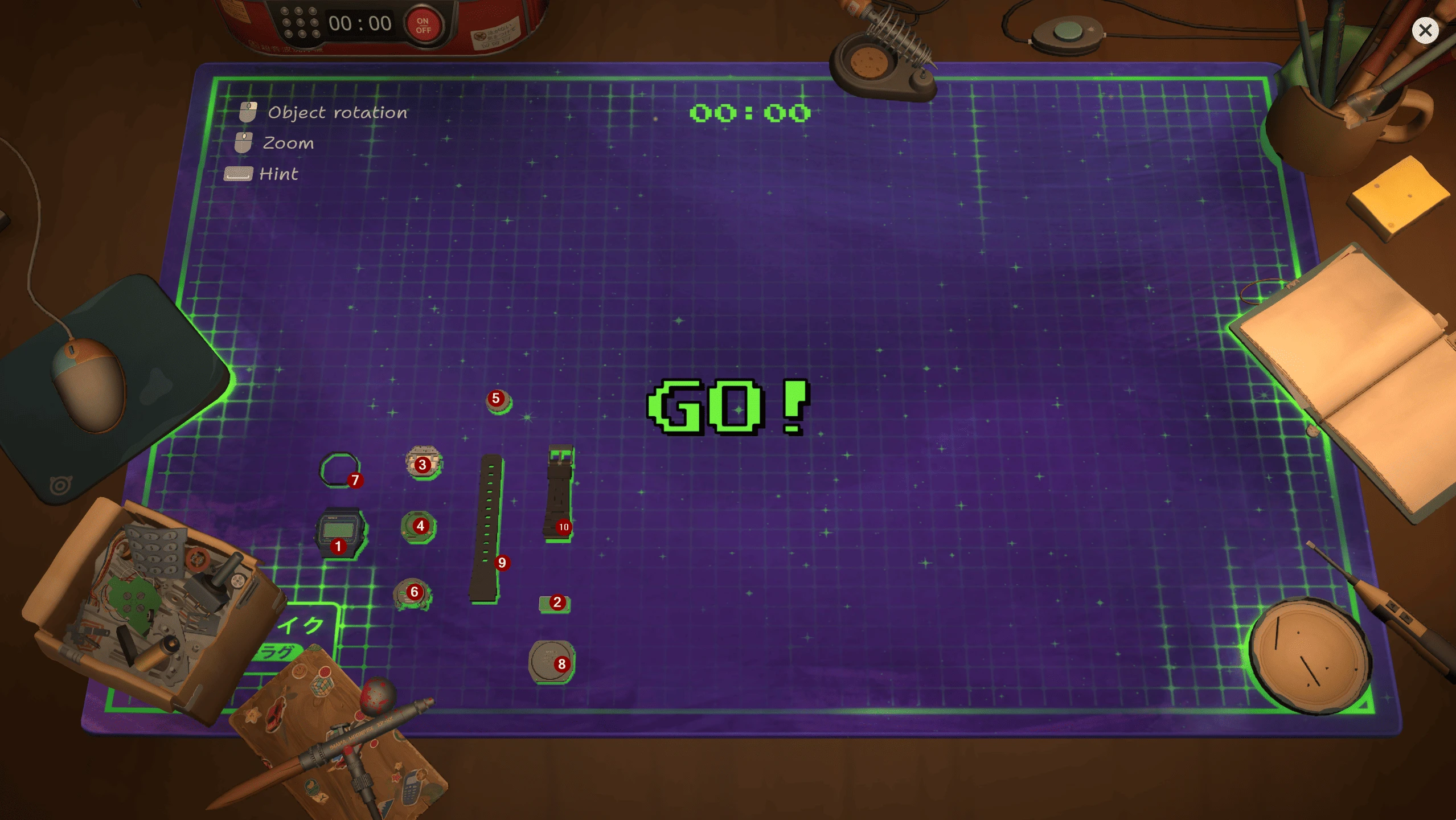
The two watch straps lie separately beside the small internal parts. Competition layout; red numbers are the source author’s annotations.
Reassemble without turning a record into a guess
Use the notebook list below to account for every piece, then follow the placement preview and exposed mounting points in your session. The screen, circuit board, battery cover and gasket are separate entries; do not assume closing the back proves all internal pieces are installed. If the game allows a different installation order, record it rather than forcing the notebook sequence. Before handing the watch back, check the actual ticket and test the device.
What to capture if the strap remains blocked
Keep a separate save. Capture the selected part name, both sides of the watch, the placement preview and the remaining task counter. Include your game build and whether this is a customer repair or a competition. That evidence can distinguish a selection mistake from a reproducible placement failure. Buying another strap or restarting the campaign is not a proven solution.
Nerdio W-91F FAQ
Are there ten screws? No: ten is the recorded component count, not a screw measurement. Is Bottom Strap interchangeable with Top Strap? They are separate notebook entries, so match the exact item. Has the strap issue been confirmed fixed in 1.0.015? The sources here do not establish that. Where can I check the recorded list? The linked footage starts at 9:46:54; compare it with the notebook in your own build.
Research links
These are the primary pages used to check the facts and current release context in this guide.
Official information, observable release behavior, and community reports are deliberately separated. A community report is not presented as a universal fix until it can be reproduced or supported by current patch notes.