ReStory turns electronics repair into a deliberate loop. The reliable approach is diagnostic: observe, isolate, clean, replace when justified, then verify. Check whether the part is currently inside the cleaning machine before treating it as lost or buying a replacement. Players report that the parts list can mark items in the Sonic Bath as missing until cleaning finishes and they return to the bench. This is a UI report, not proof that the part was deleted. Count what entered the bath, let the cycle finish, empty it, and recheck the Notebook.
Keep your place while you work
Progress is stored only in this browser and is never uploaded.
Part shows as missing while it is in the Sonic Bath
Check whether the part is currently inside the cleaning machine before treating it as lost or buying a replacement. Players report that the parts list can mark items in the Sonic Bath as missing until cleaning finishes and they return to the bench. This is a UI report, not proof that the part was deleted. Count what entered the bath, let the cycle finish, empty it, and recheck the Notebook.
Hidden or missing part — cannot complete an order
Use this as a troubleshooting checklist, not as a guaranteed official fix. First rotate the device and inspect behind it and along the workbench edge. Compare the Notebook part list with the device and inventory, check the Sonic Bath, then restore a copied protected save. If the part is still absent, record the build, device, order, missing part and a screenshot before reporting it.
- Behind or underneath the device
- Workbench edge and visual occlusion
- Notebook part list
- Inventory and donor boxes
- Sonic Bath
- Copied protected save
- Bug report with build, order and missing-part name
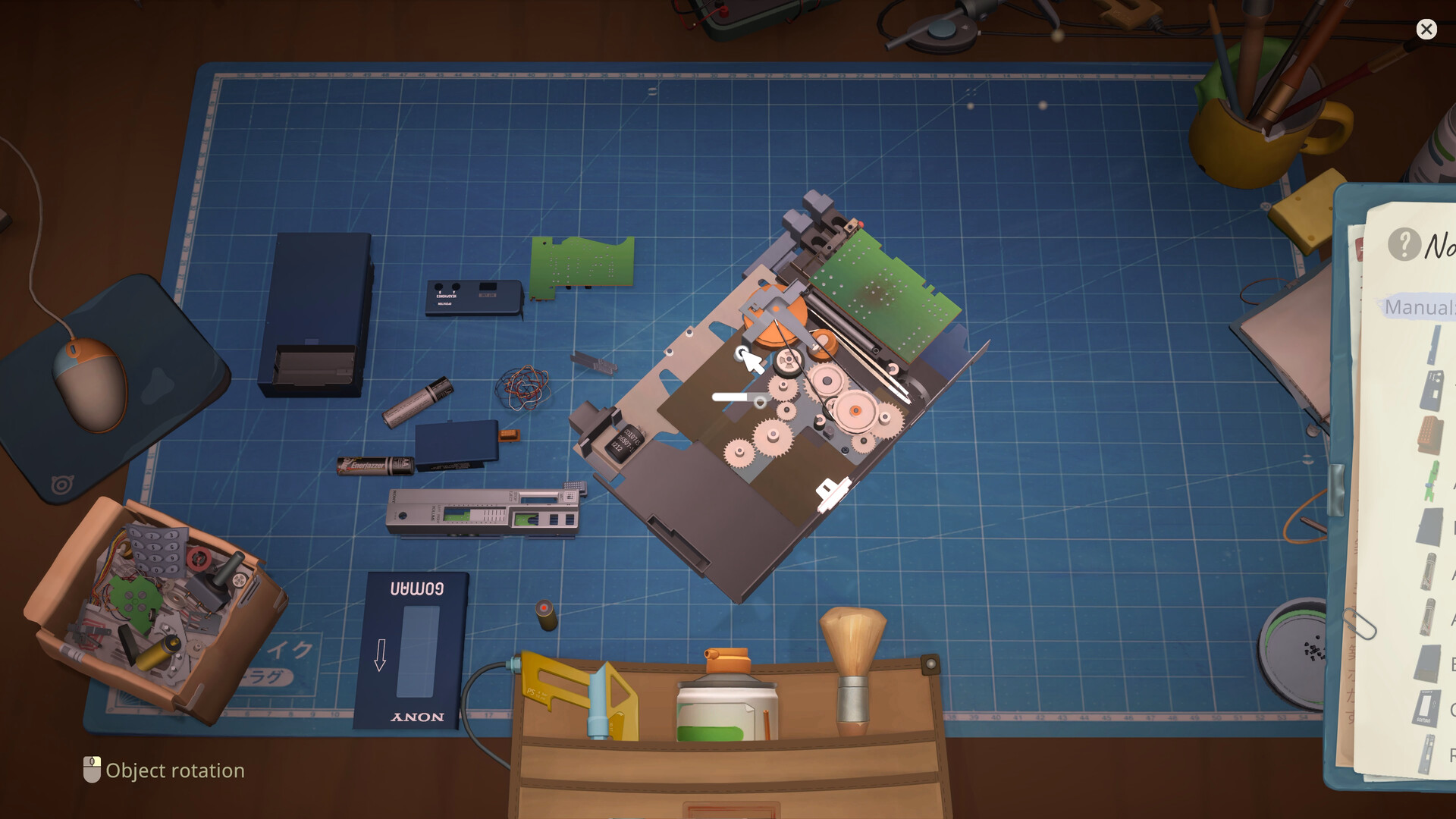
Keep removed parts visible and grouped by layer. Use the recorded order as a reference; if your Notebook shows something different, follow the game.
Brick Game part-placement report — checked September 14
Status: player report visible in the current discussion list; full post not verified. This is an ordinary Brick Game repair report, not the XI-Box competition case or Yui's paint request. The summary says no part would place even after trying all parts. Build, cause and a successful recovery are not verified, so this page does not present a universal fix.
| Field | Recorded value |
|---|---|
| Source scope | Discussion-list summary only |
| Reported symptom | No placement highlight; player says every part was tried |
| Build / cause | Not verified / not verified |
| Recovery | Not verified |
| Next safe evidence | Full thread, current build, device screen and reproducible save state |
The core repair loop
The official game description identifies disassembly, cleaning, replacing faulty parts, and reassembly as the heart of restoration.
- Accept and review the device
- Inspect and identify the likely fault
- Disassemble in a controlled order
- Clean accessible components
- Source and install the needed part
- Reassemble and complete the order
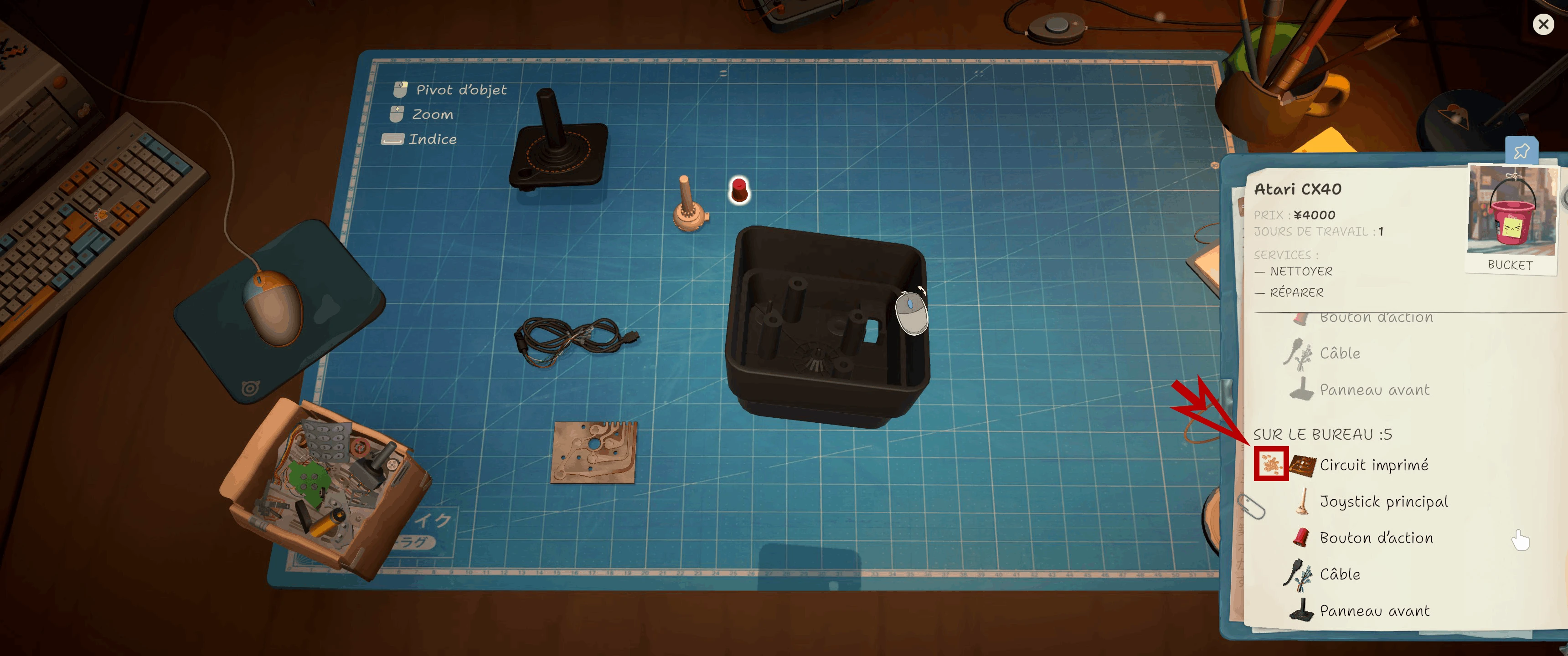
The CX40 notebook marks a dirty circuit board. Check this status before cleaning or replacing a part.
Do not turn every repair into a parts order
Cleaning and inspection exist for a reason. Confirm what the job actually needs before committing money to a replacement.
Treat organization as a tool
When several covers, boards, and fasteners are on the bench, finish one logical layer at a time. A calm order is faster than hunting for one forgotten screw at the end.
When a repair appears stuck
Re-check the task wording, inspect all reachable surfaces, confirm no fastener is still holding a layer, and verify that the replacement matches the fault. Save-and-reload advice will be documented only when a reproducible release-version issue is confirmed.
Diagnose before you remove parts
Start by reading the customer request and inspecting the assembled device. A symptom is not always the same thing as the failed component, so avoid buying a replacement merely because its name sounds related. Rotate the device, look for every fastener, and note which surfaces are still blocked. The useful question is not “what can I click?” but “what layer must come off before the next operation is possible?”
Once the device is open, preserve a consistent order. Work from the outer shell toward internal assemblies, finish one layer before starting another, and keep removed parts visually organized. ReStory simplifies real electronics work, but the game still rewards the same calm sequencing that makes a physical teardown understandable.
Cleaning is part of diagnosis
Official descriptions place cleaning between disassembly and replacement. Clean exposed pieces methodically instead of brushing random surfaces until the interface changes. If progress seems stuck, check whether another cover or component is hiding the remaining area. A visually small patch can be easy to miss when the device is rotated at an awkward angle.
The automatic ultrasonic bath is a later convenience confirmed by its associated achievement, but launch notes also mention gadgets becoming stuck in the sonic bath. When that happens, record the device and build before relying on an old workaround. Manual cleaning remains a useful fallback while checking current patch notes.
Replace only a supported fault
A replacement part costs money and can send you back to the browser, marketplace, or inventory. Confirm that the order or diagnosis supports the swap, then verify that the part matches the device. If the new part will not seat, re-check orientation, remaining fasteners, and whether an adjacent piece must be installed first.
Soldering and reprogramming appear as distinct progression systems in the public achievement list. They should not be treated as universal answers for every repair. Use the operation the job calls for, with the required equipment, and return to the normal assembly sequence once it is complete.
Recover from a repair that will not finish
First compare the task list with the current physical state of the device. Look for an uncleaned surface, a missing screw, a cable or board that has not been returned, or a replacement that is present but not fully installed. Rotate the object back to a neutral view and trace the teardown in reverse.
If the state appears correct, save the game and document the exact step before restarting. Check the official known-issues post and the Steam technical discussion board for the current build. Launch reports include firmware problems, an IDM device disassembly error, ultrawide disassembly issues, and gadgets stuck in the sonic bath, so a reproducible bug should not be confused with a missing repair step.
Bench-side diagnostic checklist
When a repair resists completion, troubleshoot in a fixed order. First, return to the ticket and confirm whether the requested outcome is cleaning, replacement, customization, firmware work, soldering, or a combination. Second, inspect the assembled exterior and count visible screws, covers, doors, cables, and removable modules. Third, open the device from the outside inward and stop after each layer long enough to see what became reachable. Fourth, clean every newly exposed target before assuming that a component must be replaced. Fifth, compare the observed fault with inventory and browser listings; a familiar-looking part from another device family may not be valid. Sixth, perform special operations only when the correct component is exposed and the required equipment is available. Seventh, rebuild in exact reverse order, checking orientation and seating before adding the next cover. Eighth, compare the restored device with the original assembled state and re-read the remaining task indicator. If those checks pass but the job remains blocked, document the platform, build, display mode, device, order source, part, and interaction. Then consult the newest official announcement and Steam technical discussions. This is particularly important for launch reports involving Guitar Legend or MyPod firmware, IDM disassembly, competition inventory, ultrawide views, and sonic-bath removal. A reproducible software issue needs different treatment from a forgotten screw, and recording the boundary saves other players from repeating the same dead end.
- Ticket: identify the requested operation and customer context
- Exterior: count fasteners and removable layers before disassembly
- Interior: expose one assembly at a time
- Cleaning: inspect every reachable face at a neutral camera angle
- Parts: match the device and demonstrated fault
- Special work: confirm soldering, firmware, or tool requirements
- Reassembly: reverse the teardown without skipping orientation checks
- Bug report: include build, platform, resolution, device, and exact blocked step
Research links
These are the primary pages used to check the facts and current release context in this guide.
Official information, observable release behavior, and community reports are deliberately separated. A community report is not presented as a universal fix until it can be reproduced or supported by current patch notes.