The IDM ThinkerDad is an 18-part laptop with a recorded ¥110,000 working value. The figures below come from a current independent game database, not official patch notes; confirm the Notebook and live counter before spending parts or entering a competition.
Device Quick Data
- Parts
- 18
Recorded
Recorded in the linked source.Build not recordedGamesRef device recordInventory record; use in-game placement prompts for assembly. - Screws
- —
Unknown
No reliable value is available yet.No publishable evidenceAwaiting a reproducible observation. - License
- IDM ThinkerDad License
Recorded
Recorded in the linked source.Build not recordedGamesRef device recordLicense listed in the source record. - Observed sale value
- ¥110,000 recorded
Recorded
Recorded in the linked source.Build not recordedGamesRef device recordNot a current-build price measurement. - Competition
- —
Unknown
No reliable value is available yet.No publishable evidenceAwaiting a reproducible observation. - Difficulty
- —
Unknown
No reliable value is available yet.No publishable evidenceAwaiting a reproducible observation. - Current build
- 1.0.015
Confirmed
Supported by official information, a developer reply or first-party testing.Build 1.0.015Verified: Steam build and official announcementsSite build reference; not a test of every field. - Common issue
- —
Unknown
No reliable value is available yet.No publishable evidenceAwaiting a reproducible observation.
Disassembly Layers
Layer order not yet verified; record the in-game Notebook before disassembly.
IDM ThinkerDad at a glance
Current records classify it as a hackable laptop that requires the IDM ThinkerDad license. Every listed component appears once. Buying all replacement parts is a reference cost, not a recommended strategy: diagnose first and reuse every clean, working component.
All 18 recorded parts
Back Panel; Back Casing; Battery; CD Disc Drive; Cable; Display; Display Lid; Frame; Hard Drive; I/O Shield; Keyboard; Keyboard Panel; LED Board; LED Panel; Motherboard; RAM; Slider Circuit Board; Speaker. Keep these names aligned with the Notebook because similarly named parts from other models are not interchangeable.
Safe teardown and reassembly order
Document the outside before removing the back layers. Keep fasteners with their layer, disconnect the battery and cables before lifting boards, and photograph the display-hinge area. Reassemble in exact reverse order: inner boards and cables first, frame and keyboard layers next, display layers and outer casing last.
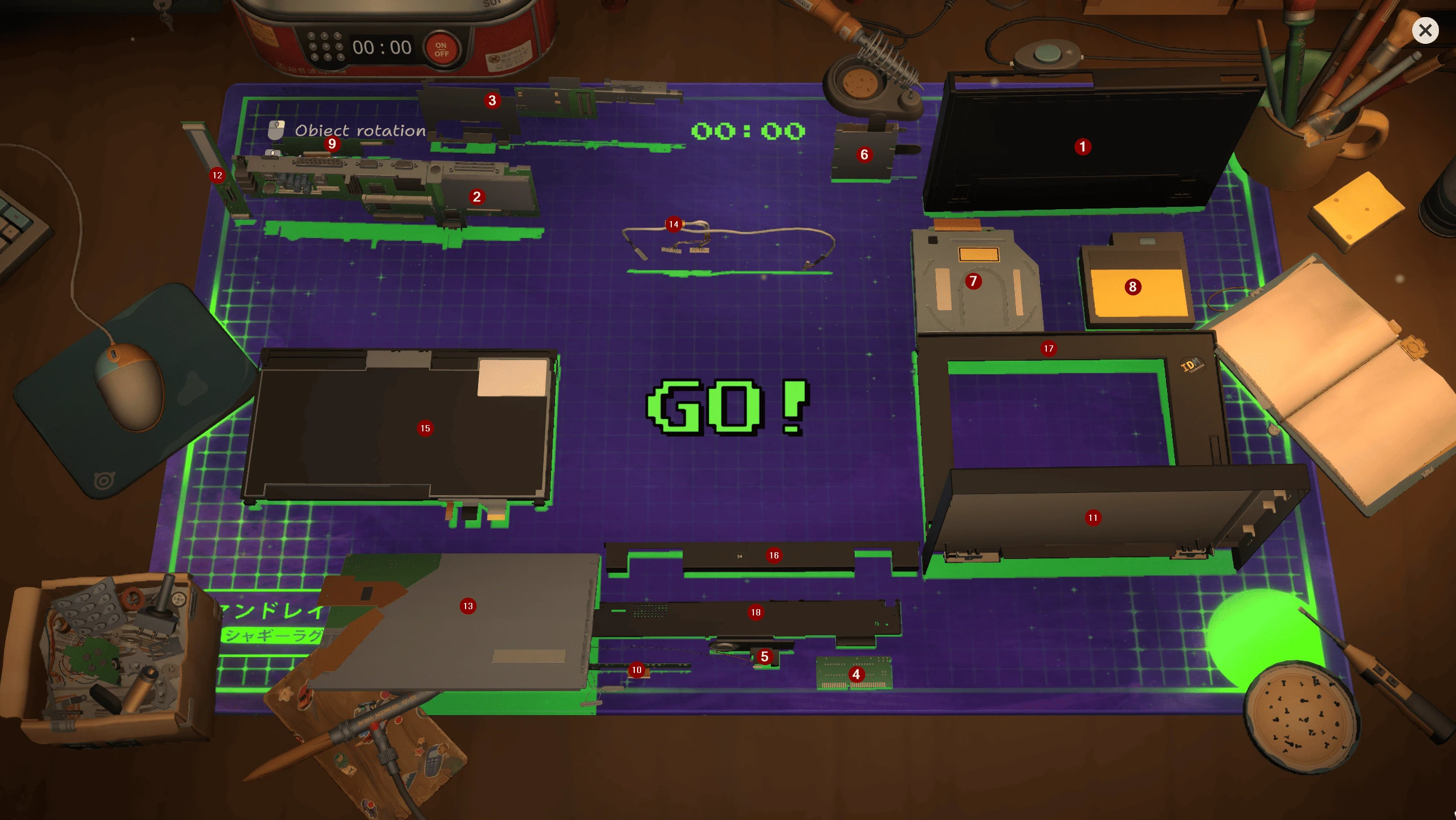
ThinkerDad display, keyboard, chassis, boards and connecting cables. Competition layout; red numbers are the source author’s annotations.
Five walk-in orders and what they prove
The database currently lists five visits: Shinji and Stranger have recorded repair states and ¥27,000 rewards; later Shinji, Furutsuno and Kiyoko entries are present but do not yet have complete repair/reward data. Missing database values are not zero-value jobs, so read the live ticket.
Competition and patch status
Official 1.0.013r notes say the IDM ThinkerDad competition was fixed. That establishes patch history, not a permanent guarantee. On 1.0.015, preserve a save before entry, verify the exact event device and record whether the timer, parts counter and finish screen agree.
Common stuck points
If a layer will not lift, search for a hidden fastener or connected cable rather than forcing it. If a part is unavailable, verify the license and the model-specific category. If a competition will not finish, compare the remaining-parts counter, current build and event state, then report with a save and video.
Return-to-customer checklist
Confirm all 18 named components, every cable connection, the battery, keyboard and display layers, a zero remaining-task counter, successful verification and the correct customer ticket. Keep one save from before hand-in.
Checklist says Backcase is missing even though I have one
This report resolved as a localization ambiguity, not a parts-check bug. ThinkerDad has two different rear-case parts; in German both can display as “Gehäuserückseite.” Compare shape, layer and placement. Evidence: player-confirmed, not an official patch.
Research links
These are the primary pages used to check the facts and current release context in this guide.
Official information, observable release behavior, and community reports are deliberately separated. A community report is not presented as a universal fix until it can be reproduced or supported by current patch notes.