The Fuzzby update is released, adding Fuzzby and the original Nony PlayMachine Controller. The story-progression fix is a separate beta_version branch for affected players. The previously teased device is still in development; this release does not confirm all earlier story additions.
Start with the situation that matches your game
This independent guide turns the publisher’s announcement into next steps. It is not a claim that we have reproduced every fix. Keep your existing save and tracker progress while checking the installed version and branch.
Read the complete official announcement
| Your situation | Read next | Check first |
|---|---|---|
| What was released? | New devices below; update timeline | Installed build and default/beta branch |
| Story stopped advancing | Story progression help | Last task, visible objective, separate save backup |
| Deck or controller input | Steam Deck controls and settings | Built-in versus external input and actual options |
| Repair still fails | Device Database and Current Problems | Exact device, order, symptom and reproduction steps |
| Competitions or achievements | Competition guide and Achievement tracker | Keep existing saved progress; do not reset totals |
New devices: confirmed names, separate repair records
For a recorded Fuzzby restoration, open the Fuzzby repair guide with four creator-video checkpoints. A complete Nony PlayMachine Controller repair record is still pending. Fuzzby and Nony PlayMachine Controller are the two names confirmed in the announcement. The controller is not the existing Nony PlayMachine console. Complete part lists, screw counts, licenses, prices, order triggers and record targets have not been verified here; similar hardware is not a substitute. A useful repair record matches the order, each disassembly layer, the selected parts and the finished result on one build and platform.
Official new-device announcement and footage
- The previously teased device remains in development.
- This release does not confirm that every earlier Kaito/Haruhi story addition has arrived.
- New devices, competition records and Steam achievements are different lists.
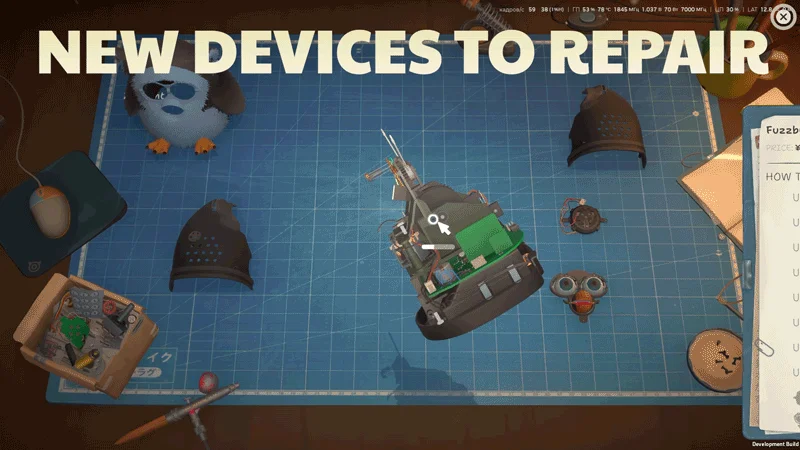
Official promotional frame: Fuzzby with its outer shell removed. The original development-build label remains visible; this is not a current-build parts test.
Story stuck? Choose the beta branch only if affected
The publisher’s story-progression fix uses beta_version. Players without this issue do not need that branch. Check Story progression help first if an objective is merely unfinished, and use the Post-story guide if you have already reached the ending.
Official Story Progression Fix instructions
- Before changing branches, make an independent backup using Save location and backup guide. Do not delete your only save or rely on cloud synchronization as a rollback copy.
- Open the game’s Steam properties and its game versions/betas controls, then select beta_version according to the publisher’s current instructions.
- Record the build, platform, branch and last completed task. Test the same blockage instead of changing several conditions at once.
- After the fixes are applied, return to Default in the game versions/betas controls as instructed in the announcement. Keep the backup separate.
- If the issue remains, preserve the checkpoint and report the observed result. A missing visitor, competition invitation and an unfinished task do not automatically have the same cause.
Controls and Deck presets: use the new options for your symptom
The announcement adds controller cursor sensitivity, device rotation speed and an option to disable cursor acceleration. It also lists dedicated graphics presets for Deck, Deck OLED and Steam Machine. Graphics settings are now saved locally per computer rather than synchronized through Steam Cloud. Use Steam Deck controls and settings for built-in versus external input; use Controller settings for a PC controller. These are announced options, not benchmark results or universal sensitivity values.
Match a repair report to the announced fix
Check the installed version, order, scene and input method, then repeat the same action. Keep old reports as dated history rather than erasing them. Officially announced fixes are separate from our own tests and from players reproducing an issue after updating.
Officially announced fix categories
| Symptom family | Announced change | Focused guide |
|---|---|---|
| Painting stutter or leaks | Older-GPU painting, precision/performance, painting/shipping memory leaks | Painting and performance |
| Wrong palette, camera panel or Paint 0% | Do not merge these into a single performance diagnosis | Airbrush and palette checks |
| Xi-Box disassembly | A screw without an associated part | XI-box repair |
| Solder state changes after reload/cleaning | Trace/solder persistence and quest-board requirements | Soldering checks |
| Competition parts from an old save | Missing-part recovery and purchase/workbench fixes | Competition troubleshooting |
Official footage: two devices, not a repair benchmark
The publisher-linked trailer and promotional frames show Fuzzby and the original Nony PlayMachine Controller. They are official promotional material, not this site’s hands-on repair test. The stills below preserve the original in-frame development-build label; it does not establish current part counts. The source animation is available through the official announcement, without loading multiple large GIFs automatically.
Official announcement and original animations
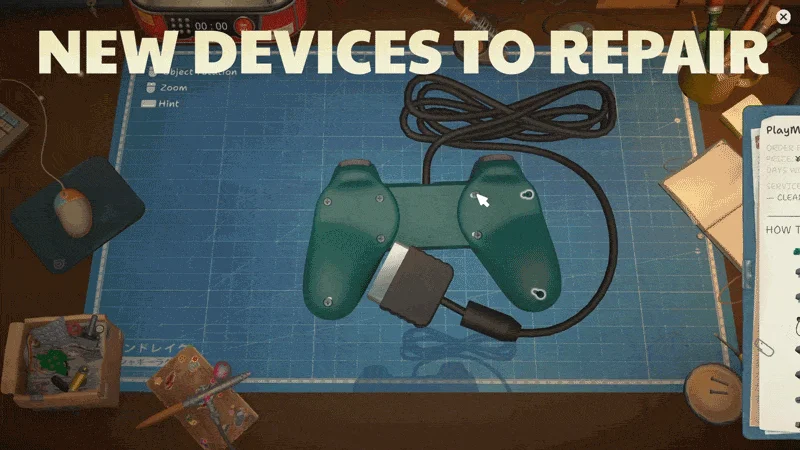
Official promotional frame: the original Nony PlayMachine Controller, separate from the console. This is not a Deck settings screenshot.
Do I need to start a new game?
The source does not establish that everyone must restart. Keep current progress and a separate backup. Diagnose the specific issue before taking irreversible action; no save is guaranteed to recover.
Should I change the achievement or competition total?
Not automatically. New devices, available competitions, raw time labels and Steam achievements are different sets. Keep existing saved progress, the 50-item achievement checklist and the recorded competition list until current-game evidence establishes a change. Do not rename the old raw Furby label to Fuzzby or copy the PlayMachine console’s data to the controller.
Is this a worldwide mobile release?
No worldwide mobile-download conclusion follows from this PC update. Use the Mobile status page and the official store for your region and device. The announcement points to Google Play pre-order and says iOS follows later; pre-order is not the same as a playable download.
Where should I report a remaining issue?
Use the developer’s discussion and bug-reporting links in the official announcement. Include platform, installed build, branch, task and reproducible steps. Avoid posting private account details or your only copy of a save.
Announcement, build record and article dates
The official Steam News API records the announcement at 27 October 2026, 17:48:59 UTC — 28 October, 01:48:59 in UTC+8. SteamDB separately records public build 26249628 and beta_version build 26249437. These numbers are Steam build IDs, not a verified semantic version such as 1.1.0. This article was published on 28 October; its publication date is separate from the game announcement. Current-build part counts, prices, settings benchmarks and hands-on outcomes remain unverified.