Patch 1.0.013r officially fixes items lost in Sonic Bath. Update before using an old reload workaround; the guide below separates current operation, achievement credit, and historical stuck-item reports. Usually not in the early game: manual cleaning is more direct when compatible parts are rare and cash must cover orders and bills. It becomes worthwhile in the mid or late game when multi-part devices repeatedly fill a batch and you can complete an independent shop task while the bath runs. If you wait beside a half-empty cycle, the upgrade can slow the workflow instead of speeding it up.
Is the Sonic Bath Worth It?
Usually not in the early game: manual cleaning is more direct when compatible parts are rare and cash must cover orders and bills. It becomes worthwhile in the mid or late game when multi-part devices repeatedly fill a batch and you can complete an independent shop task while the bath runs. If you wait beside a half-empty cycle, the upgrade can slow the workflow instead of speeding it up.
Kaiju N3 vs N6 vs N9
Choose by batch capacity and cash pressure, not an unverified speed claim. Current community catalogs record the same function with larger trays; no reliable per-cycle timing was found, so this table does not claim that N9 cleans three times faster.
| Sonic Bath | Capacity | Price | Cost per slot | Best fit |
|---|---|---|---|---|
| Kaiju N3 | 3 parts | ¥80,000 | about ¥26,667 | Early unlock when cash is tight |
| Kaiju N6 | 6 parts | ¥120,000 | ¥20,000 | Balanced mid-game batches |
| Kaiju N9 | 9 parts | ¥160,000 | about ¥17,778 | High-volume late-game cleaning |
Lost items fixed in 1.0.013r
Patch 1.0.013r officially fixes the bug with items lost in Sonic Bath. Update and test on the current build before restoring an old checkpoint. A part that still vanishes should be reported with the device, order, save slot, cleaning sequence, and last visible state.
Does Sonic Bath count toward Big cleaning and Galactic cleaning?
Yes — starting with patch 1.0.011r. The official notes state that parts cleaned with the Sonic Bath now count toward the cleaning achievement. Let the cycle finish and verify the part's cleaning state before checking progress; footage or guides from earlier builds may still say the bath does not count.
What belongs in the sonic bath
Use the bath only when the currently exposed component is accepted by the tool and the job still marks it as dirty. The bath does not diagnose a fault, replace a broken piece, clean every exterior surface, or repair an assembled device by itself. Inspect first, dismantle until the relevant part is removable, and keep every component associated with its original device.
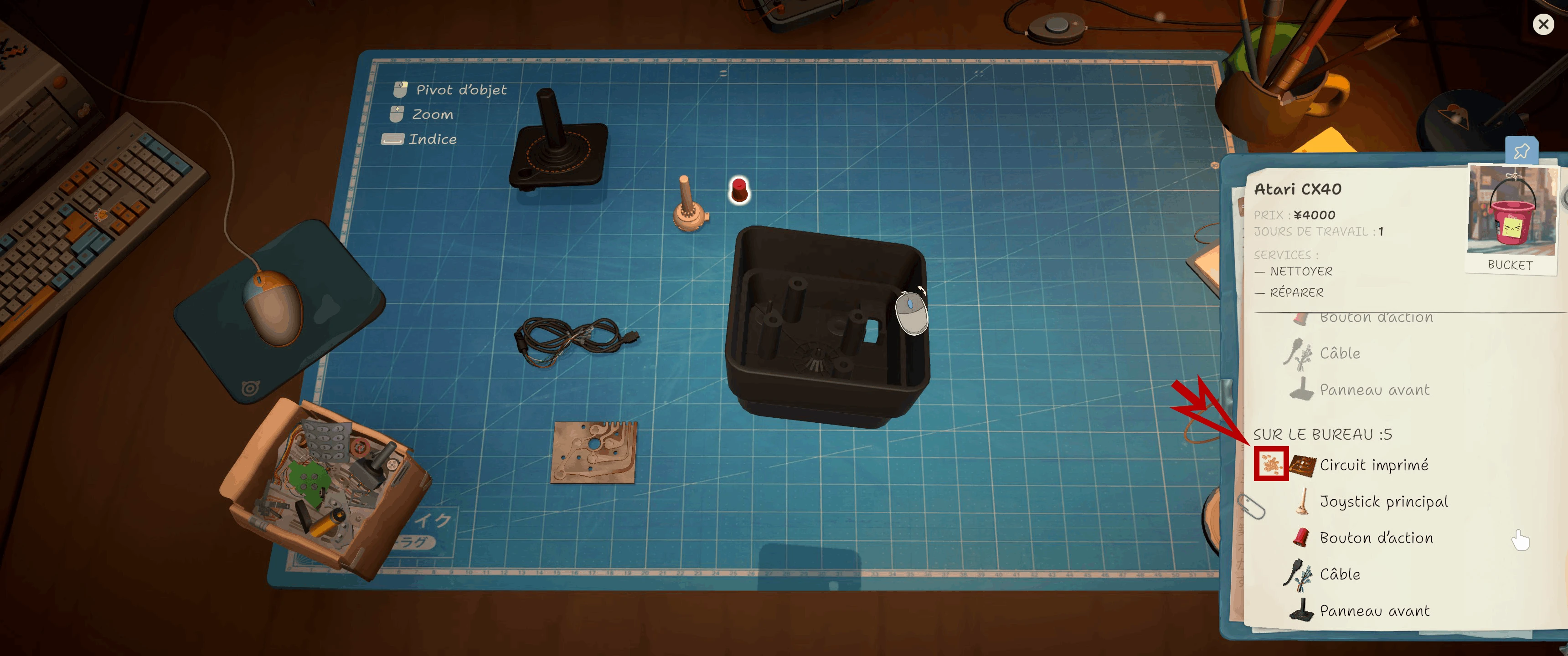
The CX40 notebook marks a dirty circuit board. Check this status before cleaning or replacing a part.
Safe operating sequence
Create a checkpoint before loading a customer-critical item. Select one compatible dirty component, place it in the bath through the intended interaction, start one cycle, wait for the completion state, remove the same item, and return it to the correct device. Verify that its dirt requirement changed before reassembly. Changing rooms, opening several panels, or loading unrelated work during a cycle adds uncertainty when diagnosing a problem.
Bath or manual cleaning?
Choose the operation from the part and the bottleneck rather than the price of the machine.
| State | Use | Reason |
|---|---|---|
| Exposed part is accepted and marked dirty | Sonic bath | The tool can automate this supported cleaning step |
| Outer case or assembled device is dirty | Manual cleaning first | The required surface may not be bath-compatible |
| Part is broken rather than dirty | Replace or repair as requested | Cleaning cannot restore a failed component |
| One rare compatible part appears | Manual workflow may be enough | The upgrade needs repeated use to repay its cost |
| Many recent jobs use compatible pieces | Bath becomes a stronger purchase | Repeated saved effort creates value |
Stuck-item fix order
First wait for the full processing state and close any panel covering the machine. Return to a neutral room view and target the removal interaction, not the inventory behind it. If the item remains trapped, stop clicking, preserve the current save separately, and reload the checkpoint made before loading. Install the newest game update before retesting; the official 1.0.009r notes list a sonic-bath fix.
How to report a reproducible bath bug
Record the device, exact component, job source, bath state before and after the cycle, game build, and whether the problem survives a reload. Capture the machine and objective tracker together. That evidence separates a genuinely trapped object from an unfinished timer, incompatible part, covered prompt, or remaining manual-cleaning target.
Soldering Lines Missing After Cleaning
A reproducible version 1.0.010r report describes a dirty spare that also needs soldering: dragging it directly from the spares box into the cleaning/soldering tool can complete cleaning without loading the blue soldering lines. The current workaround is Parts box → clean → table → pick up again → soldering tool. Developer FUNTUL replied that the team is working on a fix. Preserve a save before repeating the cycle and report the device and part if this sequence still fails.
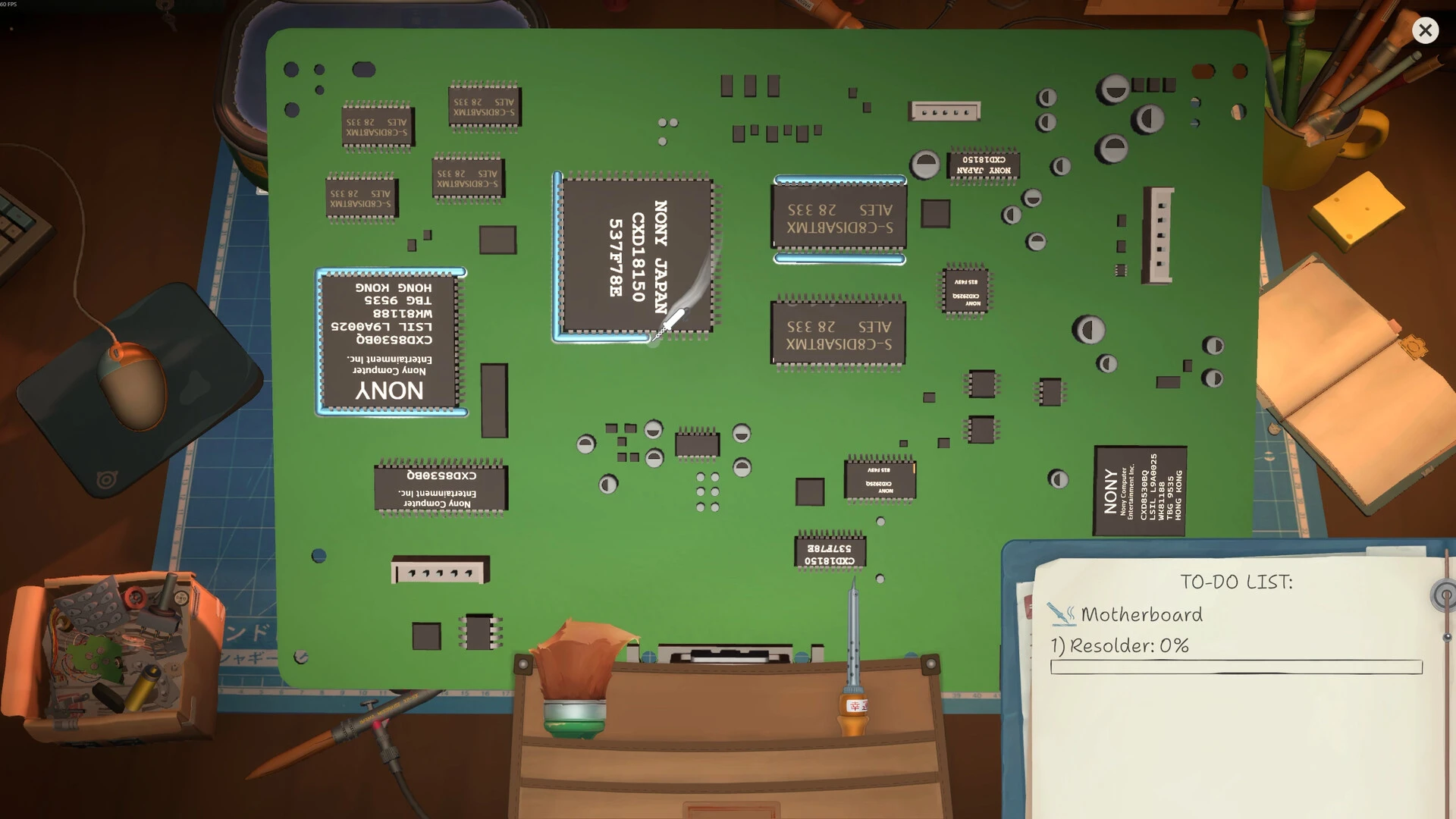
Blue outlines mark valid soldering targets. If they disappear, reset the item state on the table before retrying the tool.
Parts missing after Sonic Bath or the parts box
If a cleaned part appears to vanish or its soldering guides stop loading, stop and preserve the save. Return the part to the work surface, exit and re-enter manual cleaning, and compare against a pre-cleaning save. Current Steam reports connect this state to Sonic Bath, parts-box, and multi-cleaner sequences; treat it as a reported bug, not proof that the part was consumed.
When the Sonic Bath Slows Your Workflow
The bath can slow a job when you disassemble everything first and then wait beside one cycle, when only one rare compatible part needs cleaning, or when manual surfaces remain anyway. Use it for repeated compatible parts, start a batch while completing an independent shop task, and keep customer-device parts separated. If loading, waiting and sorting takes longer than the supported cleaning step, manual cleaning is faster for that job.
Cross-check this step with Spare parts, then use Repair guide to choose the next action without changing several variables at once.
Research links
These are the primary pages used to check the facts and current release context in this guide.
Official information, observable release behavior, and community reports are deliberately separated. A community report is not presented as a universal fix until it can be reproduced or supported by current patch notes.